An ASCII floor plan as the controlling layout reference for image generation
I generate children's activity-book pages with a native image model. Prose is a fine way to tell the model what words go on the page. It is a bad way to tell it where they go. On a worksheet, where things go is the exercise, so I hand the model a separate ASCII layout and tell it not to draw the layout's own border characters. Below is the technique and the one A/B test I kept, including the page where it made no difference.
Why placement is the hard part
The production canvas is 8.625 x 11.25 inches at 300 DPI, or 2588 x 3375 px. A fixed amount of that page is furniture I do not want the model inventing: header with the arched activity label and number circle, a footer strip with two pills, an outside-edge border on the gutter-aware side, and a reserved rectangle in the bottom corner that gets cleared to transparent alpha after approval so InDesign can set the page number as live text.
Everything inside that frame is the worksheet. And for a large class of worksheets, the arrangement of the elements is the pedagogy. A sequencing exercise works only because the four steps are presented in an order that carries no information about the correct order. The child supplies the ordering. If the page supplies it instead, the page has answered its own question.
Prose cannot hold that constraint. "Arrange the four sequence boxes clearly with a friendly heart doodle" is a sentence about content with an unbounded set of valid geometries, and some of those geometries are answer keys.
The three references
So every image page gets three inputs, and the skill definition assigns each one a job:
- JSON/page fields define what must appear: exact wording, item counts,
  blanks, answers, optional interior notes, and metadata.
- The standalone ASCII layout file defines where and how that content is
  placed. It is the controlling composition reference for the image model.
- The rendered base-template PNG defines fixed page furniture: header,
  footer, outside-edge border/decorations if present, safe area, and the
  reserved page-number/cutout zone.
Two details matter. The ASCII lives in its own file, not as a string field inside the JSON. The skill is explicit that a layout_sketch_ascii value inside JSON "is useful, but it is not enough by itself and must not replace the standalone ASCII layout file." And because the layout is made of pipes, plus signs and hyphens, every prompt carries a line telling the model to read it and not draw it:
- Use the ASCII layout sketch as the controlling spatial reference, but do
  not render the ASCII box/border characters.
The test I kept
I ran two facing pages from a first-grade human body workbook through both methods and retained the prompts and outputs. Page 57 is a right-side sequencing page, "Blood Flow Sequence." Page 58 is a left-side word-bank fill-in-the-blank page.
The two page-57 prompts share the template constraints, the title, the unit strings, the instruction sentence and all four item sentences verbatim. The ASCII arm adds a block:
Loose ASCII layout sketch for spatial guidance only:
+------------------------------------------------+
| How does blood travel? Put the steps in order. |
| Write the numbers 1, 2, 3, and 4 in the boxes. |
|                                                |
|   [  ] The blood drops off the oxygen.         |
|                                                |
|   [  ] The blood travels through the body      |
|        in arteries.                            |
|                                                |
|   [  ] The blood comes back to the heart       |
|        in veins.                               |
|                                                |
|   [  ] The heart pumps blood full of oxygen.   |
|                                                |
|      [DOODLE: circular arrows + heart]         |
+------------------------------------------------+
It also relabels the JSON header from "Canonical JSON content:" to "Canonical JSON content, which overrides the sketch if there is any conflict:" and extends the last accuracy rule from "Do not include citations, designer notes, or raw JSON text." to "Do not include citations, designer notes, raw JSON text, or ASCII border characters."
One honest note before the result. These two prompts differ in more than one field, so this is not a clean single-variable comparison. The JSON-only arm also carried an answers array and a creative_direction string that the ASCII arm dropped. That string read:
"creative_direction": "Add a simple circular path of arrows with a friendly
heart and tiny blood-drop doodles in open space. Keep the four sequence
boxes large and easy to write in."
What page 57 came back as
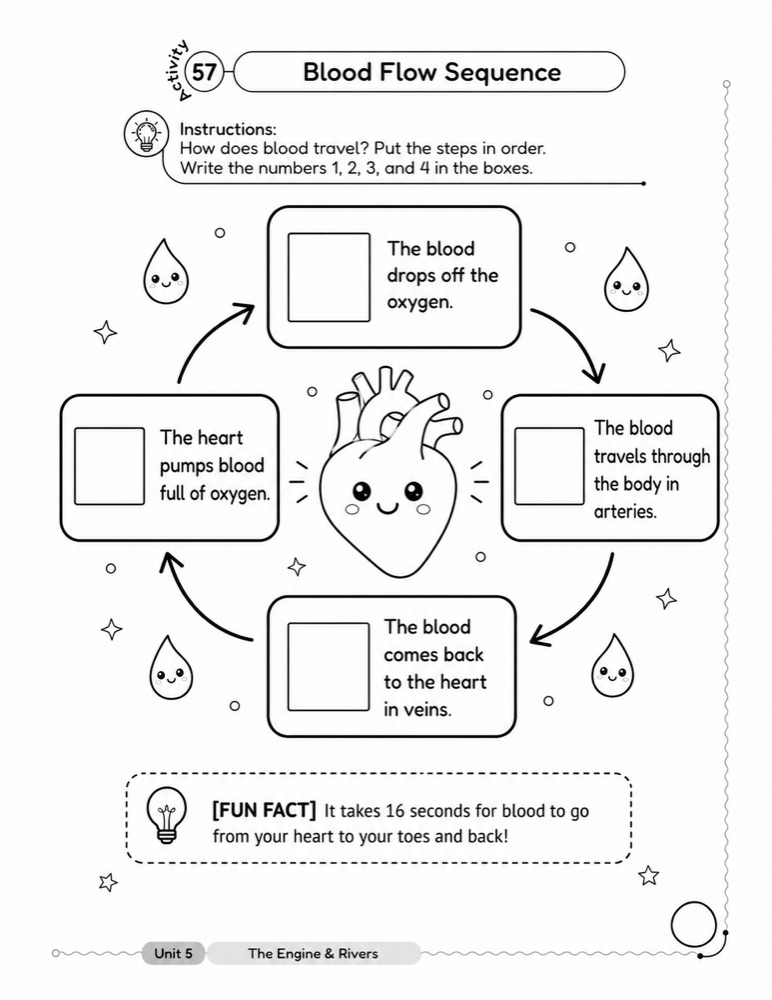
The JSON-only page is the better-looking artifact. It is also not a worksheet. The four answer boxes sit at twelve, three, six and nine o'clock, wired together by four arrowheaded arcs into a closed clockwise loop. A first grader is being asked to deduce an ordering from a diagram that draws the ordering.
It gets worse when you check the loop against the answer key. Going clockwise the chain is: "The heart pumps blood full of oxygen" (key: 1), "The blood drops off the oxygen" (key: 3), "The blood travels through the body in arteries" (key: 2), "The blood comes back to the heart in veins" (key: 4). A child who starts at the heart and follows the arrows writes 1, 2, 3, 4 and gets two of the four boxes wrong. The page hands over an answer and the answer is incorrect.
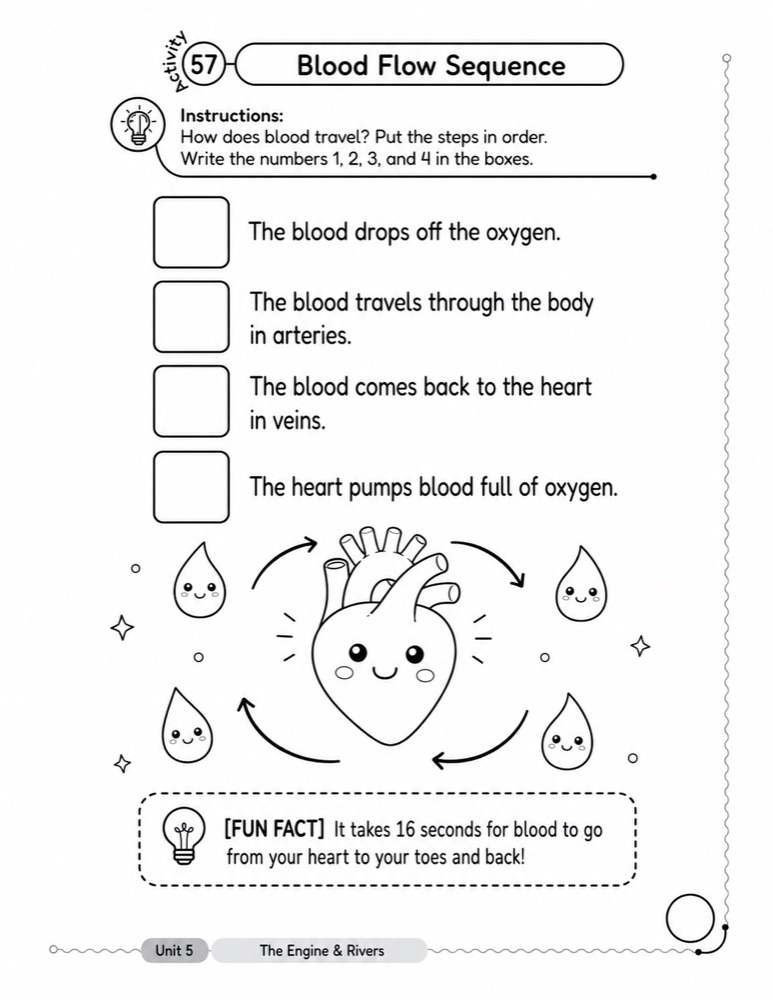
The ASCII version put four unnumbered boxes in a vertical column in the order the JSON listed them, and pushed the circular arrows down into the doodle band under the last item, where they orbit the heart and connect nothing.
Why the arrows connected the boxes
Both prompts asked for circular arrows. The JSON-only one asked for them "in open space." The ASCII one asked for them on a specific line, below all four boxes, as [DOODLE: circular arrows + heart]. Same request, one with an address.
Given an unaddressed request for arrows on a page that already contains four boxes, an image model does the aesthetically reasonable thing and connects the boxes. That is the right call for a poster and the wrong call for an exercise, and nothing in the prose told it which one it was making.
What I tried before ASCII
ASCII was not the first thing I reached for. It looks like the crudest possible way to describe a page, so I tried the precise options first.
I built worksheet layouts in React, rendered them, and handed the render to the image model as the spatial reference. React gives you exact positions, real nesting, actual sizing. Every reason to expect it to work better than a monospace sketch.
It worked worse, and by a wide margin. The model treated the render as artwork to reproduce rather than as an arrangement to follow, and I got pages that copied the reference styling and lost the pedagogy, or pages that reproduced my placeholder boxes as literal drawn boxes.
My read on why: a render specifies arrangement and appearance at the same time, and nothing in it marks which is which. Box at these coordinates, in this font, at this weight, with this border radius. The model cannot tell that I meant the position and not the border radius, so it honors all of it or none of it.
An ASCII sketch can only carry one of those two things. It has no fonts, no colors, no weights, no radii. Everything it can express is arrangement, so arrangement is the only thing the model can take from it. The coarseness is doing the work. It constrains where things sit and leaves every appearance decision open, which is exactly the division of labor I want, because the model is better at the art than I am and worse at knowing what the page has to do.
That was the surprise. I expected fidelity to help and it hurt.
One page is not a study
Everything above is a single retained comparison on a single page, and the two prompts differ by more than one field. Treat it as an illustration of a failure mode, not as a measurement.
What I can say beyond it is operational rather than experimental. I have run this process across a lot of activity books now, and ASCII layout control is what I standardized on after trying prose alone and after trying rendered React. The page 57 comparison is the clearest single case I kept, which is why it is the one shown here. I did not run a controlled trial across the catalog, and I am not going to claim a number I did not measure.
Page 58 was a tie
The same comparison on page 58 produced two pages I would both ship. Both put the word bank HEART / BLOOD / ARTERY / VEIN in a rounded box under the instruction, both numbered four sentences with a blank rule in each, both placed the BRAIN TIP chip above the footer, and neither pre-filled an answer. The JSON-only version stacked its doodles in a right-hand column and wrapped each sentence after the blank; the ASCII version ran the sentences wider and put the doodles in a band beneath item four. Those are preferences, not defects.
That result is the reason I state the claim narrowly. ASCII layout control wins where spatial arrangement carries meaning. A fill-in-the-blank page is semantically a list, so the model produces a list whether or not I draw one. There is nothing for the layout to give away.
The check I run before generating
This turns into a cheap pre-flight question: can I permute the elements on this page and change what the correct answer is? Sequencing, sorting, matching, mazes and anything with a start and a finish all answer yes. Those pages do not go to the image model without a standalone ASCII layout, and the layout has to be a geometry rather than an outline. The skill's feasibility gate says it directly: "If the ASCII layout is only a bullet list of content instead of a clear page geometry, repair the ASCII before image generation." Production runs are capped at two generations per page, so a layout you have to argue the model out of is a page you do not get.